Build a Permit History Ledger Before AI Describes Renovation Potential
AI can make renovation potential sound simple: finish the basement, add a bedroom, open the kitchen, convert the garage, build an ADU later. The business risk is that those phrases often depend on facts the CRM does not hold. A buyer, seller, agent, lender, inspector, contractor, municipality, insurer, and future appraiser may all care whether prior work was permitted, inspected, finaled, disclosed, and safe to rely on.
That is why real estate teams need a permit history ledger before AI describes what a property can become. The ledger is not a construction opinion. It is an evidence layer that tells the assistant which renovation claims are verified, which are assumptions, which need a human review, and which should be removed from client-facing language.
NAR's 2025 technology survey shows agents are already using AI-generated content in real estate workflows, and clients are responding positively to technology in the transaction. That adoption is useful only when the automation is bounded by source documents. NIST's AI Risk Management Framework makes the same operational point in broader language: organizations using AI need repeatable ways to identify, measure, manage, and govern risk. For renovation messaging, the risk lives in missing permits, undocumented scope, old safety hazards, and unapproved feasibility claims.
Why permit evidence belongs upstream
Most teams treat permit questions as an inspection-stage issue. That is too late for AI-generated marketing, buyer education, or seller prep. The language may have already influenced a showing request, a buyer budget, an offer strategy, or a seller's expectation about value.
The International Code Council's consumer guidance lists common work that usually requires permits, including new buildings, additions, residential work, renovations, electrical systems, plumbing systems, and HVAC systems. It also explains why permits matter: code officials review the work, inspections help confirm minimum safety standards, and unpermitted modifications can reduce value, create insurance problems, or complicate a later sale.
That does not mean every cosmetic update needs a legal memo. It does mean AI should not turn a photo, seller note, or agent memory into a confident renovation claim. A permit history ledger gives the system a place to separate visible condition from verified status.
The ledger fields that matter
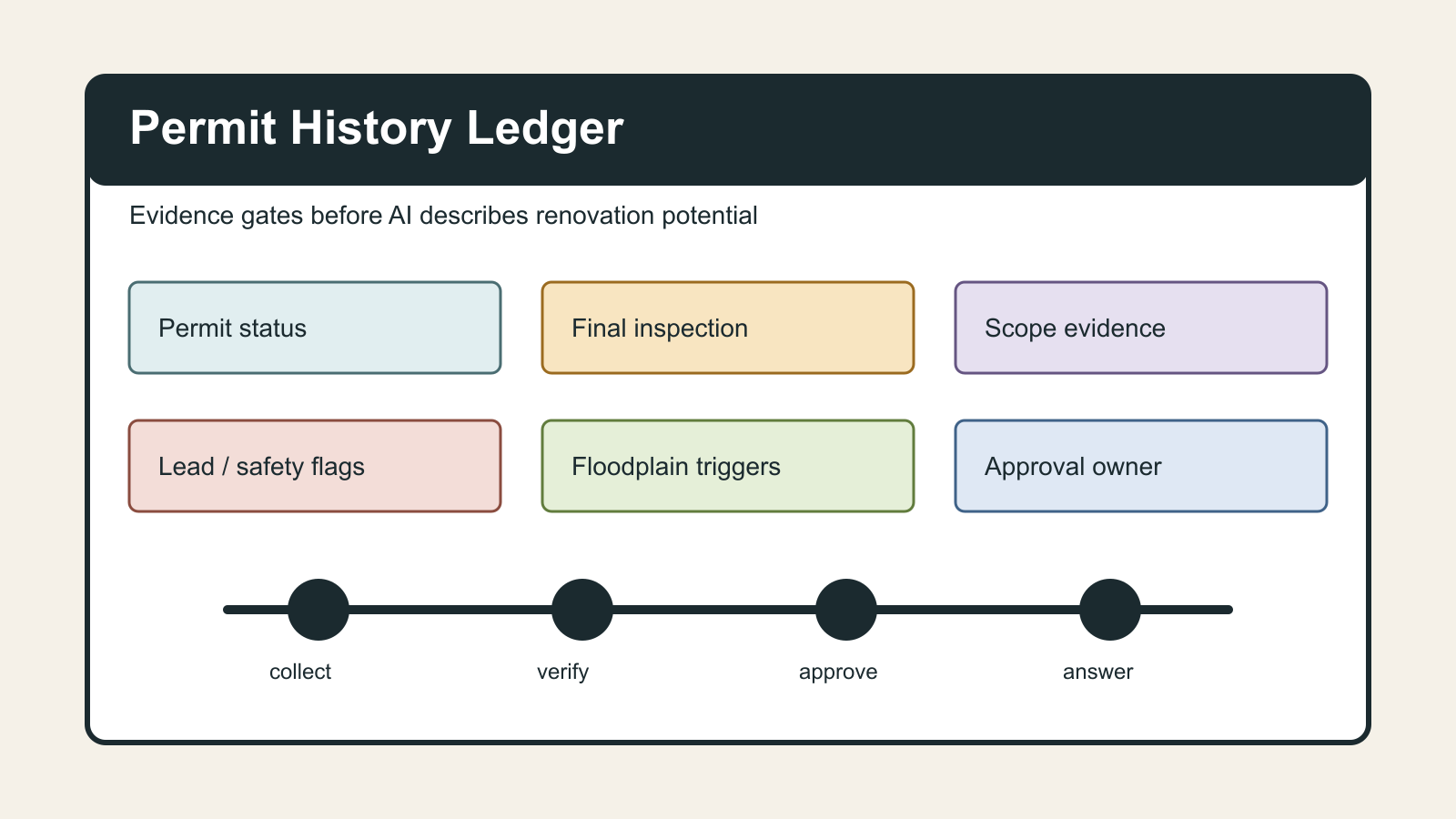
Start with a property-level record. For each renovation, addition, conversion, system upgrade, roof replacement, deck, pool, finished basement, garage conversion, solar installation, or structural change, capture the same set of fields:
- Scope name: the plain-English description of the work.
- Source of claim: seller disclosure, MLS remarks, prior listing, inspection report, contractor invoice, municipal record, permit portal, owner interview, or agent observation.
- Permit number: present, missing, not required according to the local authority, or unknown.
- Permit status: applied, issued, expired, finaled, closed, voided, open, or not found.
- Inspection status: final inspection passed, partial inspection only, no inspection evidence, or unknown.
- Approval owner: municipality, county, HOA, floodplain manager, historic district, lender, insurer, or human team lead.
- Safety flags: electrical, plumbing, HVAC, structural, egress, roof, deck, pool, lead, floodplain, fire separation, or occupancy.
- Client-facing allowance: approved to mention, mention with caveat, internal only, or do not mention.
- Next action: request record, call building department, get contractor invoice, ask seller, escalate to broker, or remove claim.
This can live in a CRM custom object, a transaction management checklist, a Notion database, or a simple Airtable. The storage system matters less than the rule: no AI output about renovation potential should bypass the ledger.
Add a source hierarchy
A useful ledger ranks evidence. Municipal records and final inspection documents sit above seller memory. Contractor invoices are stronger than a photo, but they still may not prove permit closure. MLS copy from a prior sale is not evidence; it is a lead that should be verified.
Use a four-level hierarchy:
- Verified: permit, final inspection, official record, or written determination from the authority.
- Documented but not verified: contractor invoice, scope sheet, disclosure, paid receipt, or warranty paperwork.
- Observed: visible work, photos, inspection notes, or agent walkthrough observation.
- Unverified: owner recollection, prior marketing language, neighborhood assumption, or AI inference.
Then map that hierarchy to AI behavior. Verified facts can appear in public copy if they are appropriate. Documented-but-not-verified facts can support internal questions. Observed facts should use condition language, not compliance language. Unverified facts should trigger a question, not a claim.
Handle safety-sensitive renovation topics separately
Permit status is not the only issue. Older homes and flood-prone properties can turn a renovation idea into a safety or compliance problem.
EPA's Lead Renovation, Repair and Painting program warns that renovation, repair, or painting in pre-1978 homes can create dangerous lead dust, and covered work must be performed by lead-safe certified contractors in many paid-work contexts. That is not a detail an AI assistant should improvise around. If the home is pre-1978 and the proposed copy mentions renovation, paint, windows, demolition, sanding, or child-occupied space, the ledger should add a lead-safe review flag.
FEMA floodplain guidance adds another constraint. In National Flood Insurance Program communities, substantially improved or substantially damaged structures in flood hazard areas can trigger additional floodplain management requirements. FEMA describes a 50 percent cost-to-market-value threshold that can require compliance with current flood protection rules. AI should not say a buyer can simply renovate, expand, or rebuild a floodplain property without surfacing that authority check.
The point is not to turn the assistant into a code official. The point is to prevent it from sounding like one.
Use the ledger in four workflows
Listing prep: Before the listing description is drafted, scan all owner-provided improvement claims. If the seller says the basement was finished, the kitchen was expanded, or the garage was converted, the ledger asks for permit and final-inspection evidence before AI writes about livable area, bedroom count, or expansion potential.
Buyer education: When buyers ask whether they can add a bathroom, finish an attic, build a deck, or convert space, the assistant answers with process language until verified evidence exists. It can say the team should check local permit requirements, zoning, HOA rules, contractor scope, and safety flags. It should not say the project is easy, approved, cheap, or likely.
Inspection response: When an inspection report calls out electrical, plumbing, HVAC, roof, deck, egress, or structural issues, the ledger ties each item to the repair estimate, permit requirement, contractor qualification, and approval owner. AI can summarize the open questions, but it should not draft repair demands or seller responses that imply code compliance without evidence.
Past-client nurture: Homeowners appreciate renovation ideas, but automated campaigns should not encourage risky projects. The ledger can feed safer content: keep records, check permits before work starts, use qualified contractors, document invoices, and preserve final inspection sign-offs for future resale.
What AI is allowed to say
Write a short policy that the assistant can follow:
- If permit status is verified, AI may describe the documented work without exaggerating future feasibility.
- If permit status is unknown, AI may ask for records or recommend checking with the local authority.
- If work is observed but not verified, AI may describe visible condition but must avoid compliance, bedroom, square footage, or legal-use claims.
- If a safety flag is present, AI must route to a human reviewer before client-facing output.
- If floodplain, lead, structural, electrical, plumbing, HVAC, occupancy, or HOA constraints are possible, AI must use process language and cite the need for authority-specific confirmation.
FTC home improvement guidance supports the same evidence-first habit from the consumer side: get written estimates, read contracts carefully, make sure key promises and scope details are in writing, avoid pressure, and keep notes and documents if problems arise. A real estate AI system should reinforce that operating discipline, not replace it with confident filler.
The operating result
A permit history ledger will not eliminate uncertainty. It will make uncertainty visible before AI turns it into a promise.
The practical win is simple: agents can still move quickly, marketing can still ship, and client communication can still be automated. But the system knows the difference between a verified permit record, a seller story, a contractor invoice, and an AI guess. That distinction protects clients, reduces rework, and gives human reviewers a clear queue instead of a vague worry.
Before AI describes renovation potential, make it prove what the property file actually knows.

Written by
Ben Laube
AI Implementation Strategist & Real Estate Tech Expert
Ben Laube helps real estate professionals and businesses harness the power of AI to scale operations, increase productivity, and build intelligent systems. With deep expertise in AI implementation, automation, and real estate technology, Ben delivers practical strategies that drive measurable results.
View full profile