Build a Contract Deadline Docket Before AI Sends Transaction Reminders
AI is useful for transaction reminders because it can rewrite a rough note into a clear client message, summarize a file, and keep routine follow-up moving. That is also exactly why it is risky. A real estate contract is full of dates, conditions, document dependencies, and local process rules. If an AI assistant sees an old CRM note, a stale calendar event, or a half-updated task, it can send a confident reminder that is wrong in a way that matters.
The fix is not to ban AI from transaction communication. The fix is to stop treating reminders as simple messages. Build a contract deadline docket first. The docket is a small operating layer that says which deadline exists, where the date came from, who owns it, what evidence confirms it, and whether AI is allowed to draft, schedule, or send anything about it.
This matters because real estate teams are already using more digital tools. NAR's 2025 Technology Survey reported that eSignature remained the most used tool among surveyed REALTORS, and that AI-generated content was already part of many agents' workflows. That is the operating reality: teams are not waiting for perfect systems before they automate. The docket gives automation a safer lane.
Why deadline reminders fail
Most reminder mistakes do not start with the writing tool. They start upstream.
A buyer asks whether closing is still on track. A coordinator has a date in the CRM. The lender has a different milestone in email. The inspection response changed the repair timeline. A closing disclosure is expected, but the client has not confirmed receipt. Someone asks AI to send a quick update because the team is busy.
The message sounds helpful. The system sends it quickly. The problem is that the reminder skipped the file evidence.
Closing workflows show why this matters. CFPB consumer guidance says borrowers should receive the Closing Disclosure at least three business days before closing, and its closing-process guidance tells consumers to review closing documents in advance, compare costs, ask about fees, and confirm that agreed repairs are complete. That does not mean a real estate team's AI assistant should explain federal timing rules as legal advice. It means a closing reminder should know the status of disclosure receipt, document review, repair completion, and the human owner before it says a client is clear to proceed.
A deadline docket turns that ambiguity into visible work.
What the docket should track
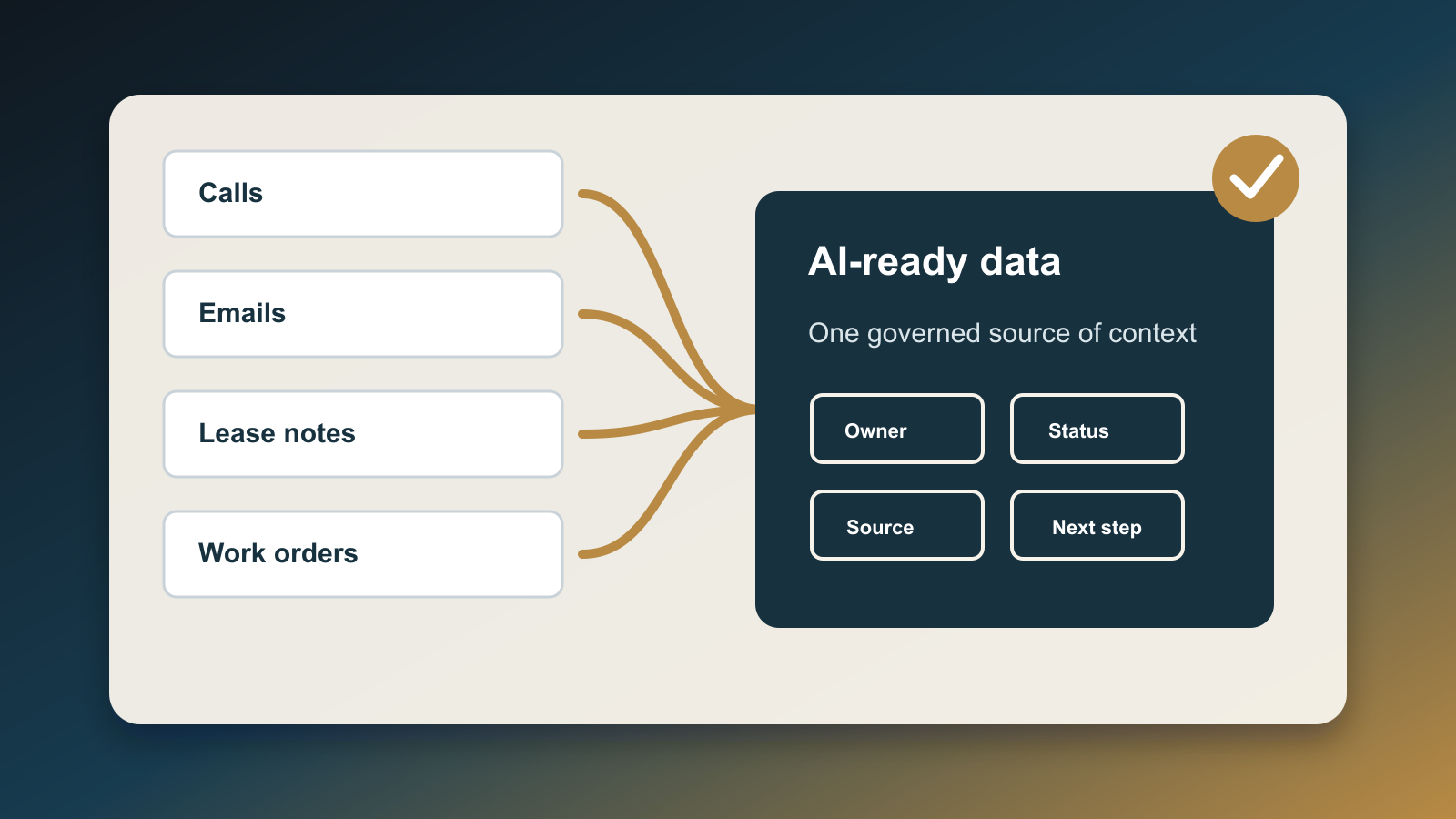
Keep the docket boring. The goal is not another dashboard full of color. The goal is a reliable transaction record that AI can read without guessing.
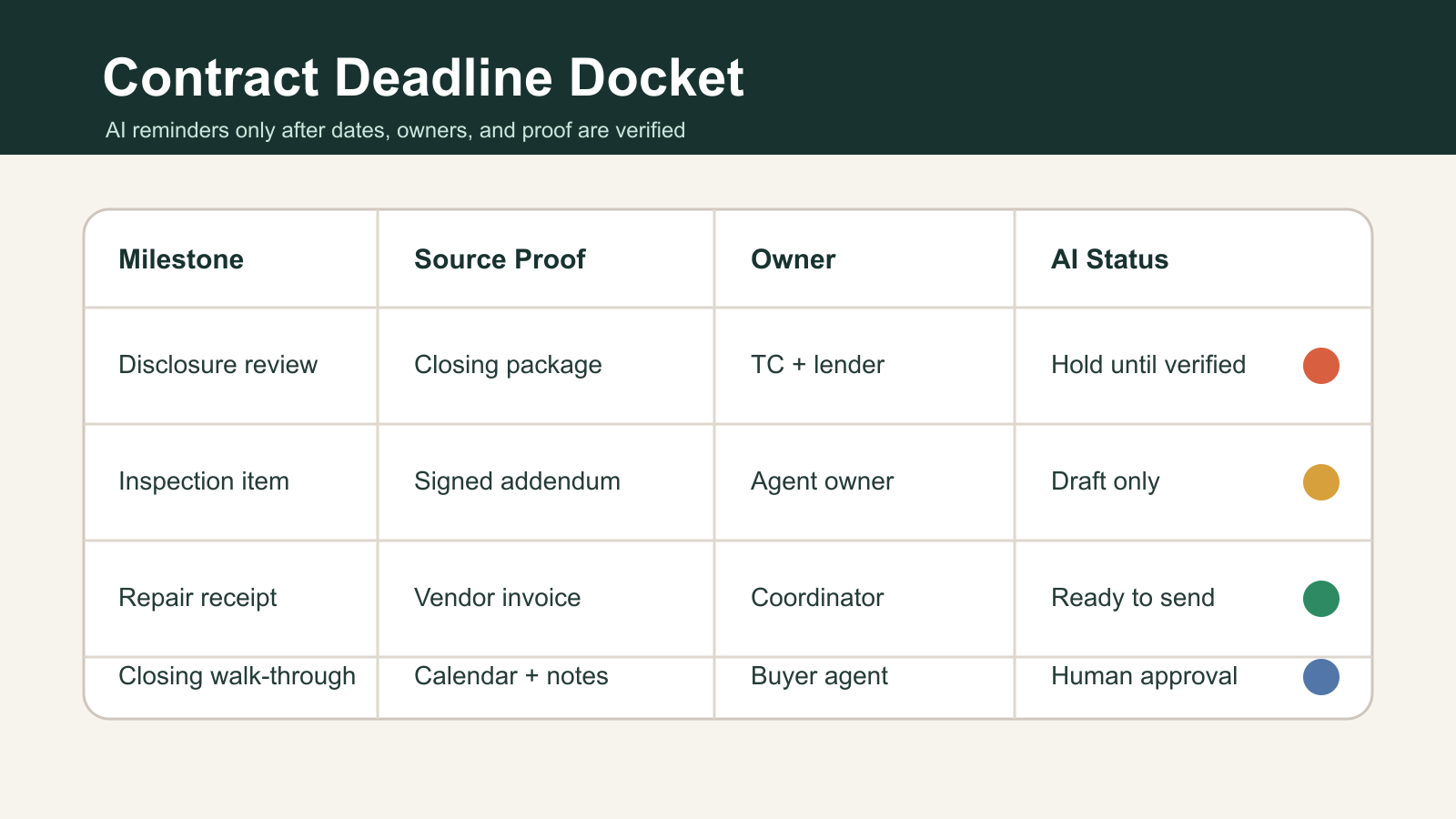
Use one row per milestone. A row should include:
- Milestone name: closing disclosure review, inspection response, appraisal condition, repair receipt, final walk-through, deposit confirmation, title item, funding condition, or closing appointment.
- Source document: signed contract, addendum, lender notice, title email, closing package, inspection report, repair invoice, or client instruction.
- Source timestamp: when the team received the evidence, not just when someone typed the task.
- Responsible owner: agent, transaction coordinator, lender, title contact, vendor, client, or broker review.
- Client-facing status: not started, waiting on source, under review, approved to mention, approved to send, or blocked.
- AI permission: no AI, summarize only, draft only, schedule after approval, or send from approved template.
- Escalation rule: what happens when the date is missing, conflicting, or inside a high-risk window.
The important field is not the date. It is the relationship between date, source, owner, and permission. A date without proof should not trigger a client reminder. A task without an owner should not become an automated promise. A message about closing should not go out just because the CRM says the deal is near the finish line.
Separate three jobs
A useful docket separates three jobs that teams often blend together.
The first job is date capture. This is clerical but critical. Someone records the milestone, source, source timestamp, and owner. AI can help extract candidates from documents or email, but a human should verify anything that changes client expectations.
The second job is message drafting. This is where AI is genuinely helpful. It can turn the approved status into plain language: what changed, what the client needs to do, who owns the next step, and what is not yet confirmed. But drafting is not approval.
The third job is send authority. Some reminders can be automated from approved templates. Others should require a person to click send. If the message touches loan terms, closing readiness, legal deadlines, repair obligations, wire instructions, contract rights, or missing disclosures, the safer default is draft-only until the responsible owner approves it.
NIST's AI Risk Management Framework is useful here because it frames AI as something organizations manage across design, deployment, evaluation, and use, not just as a tool that generates text. For a real estate team, that means the docket is part of the control system around AI: it defines context, acceptable use, review, escalation, and monitoring.
The minimum viable version
You do not need a custom product to start. Build the first version in the CRM, Airtable, Notion, a spreadsheet, or a transaction-management tool that already holds the file.
Start with five milestone types:
- Disclosure receipt and review.
- Inspection response and repair follow-up.
- Appraisal and lender conditions.
- Title, escrow, or closing-package issues.
- Final walk-through and closing appointment.
For each milestone type, define the source of truth. For example, disclosure status should come from the lender or closing package, not a vague note. Repair status should come from a signed agreement, vendor receipt, or documented walk-through result, not memory. Closing appointment status should come from the title or settlement contact, not a guessed calendar hold.
Then define the AI rule for each status:
- Waiting on source: AI may draft an internal checklist only.
- Source received, not reviewed: AI may summarize for the owner, not the client.
- Reviewed, no issue: AI may draft the client update.
- Approved to send: AI may schedule or send from the approved template.
- Conflict or missing proof: AI must escalate and stop.
This gives the team a clear default: no proof, no promise.
What the client should experience
The client should not see the docket. The client should feel the benefit.
Instead of a generic reminder that says, "We are on track for closing," they receive a precise update: the team has received a document, the owner is reviewing it, the client does or does not need to act, and the next verified checkpoint is clear. If something is not confirmed, the message says that without inventing certainty.
That tone matters. AI-generated text often sounds more confident than the underlying file deserves. A docket keeps the language matched to the evidence. It also prevents duplicate reminders when several systems are connected to the same deal.
How to wire it into the CRM
Use the docket as the trigger layer, not as a passive note.
Each row should produce one of four outputs:
- A task for the responsible owner.
- A draft message for review.
- An approved client reminder.
- An escalation item.
Do not let a general-purpose AI assistant read the entire transaction file and decide what to send. Give it a constrained prompt fed by docket fields. The prompt should include the milestone, approved status, source summary, client action, owner, and prohibited language. It should also include a rule that missing or conflicting fields must return an escalation instead of a draft.
That is the practical difference between using AI as a writer and using AI as an operator. A writer improves phrasing. An operator changes the workflow. If the workflow is not explicit, AI will fill the gaps with language.
The management report
The docket should also give the team a weekly view of process health:
- Deals with deadlines inside seven days and no verified source.
- Milestones where AI drafted but no human approved.
- Reminders blocked by conflicting dates.
- Owners with overdue review items.
- Client-facing messages sent from approved templates.
- Escalations caused by missing documents or unclear responsibility.
Those metrics are more useful than counting how many reminders AI sent. They show whether automation is reducing operational risk or just increasing message volume.
The operating rule
Do not ask, "Can AI remind the client?" Ask, "Which verified docket row gives AI permission to draft or send this reminder?"
That question changes the system. It makes contract communication depend on evidence, owner accountability, and explicit permission. It also gives AI a narrow job: turn verified workflow state into clear communication, then stop when the state is not verified.
For real estate teams, that is the difference between faster follow-up and faster confusion. Build the docket before the reminders scale.
Sources
- National Association of REALTORS, "REALTORS Embrace AI, Digital Tools to Enhance Client Service," published September 18, 2025: https://www.nar.realtor/newsroom/realtors-embrace-ai-digital-tools-to-enhance-client-service-nar-survey-finds
- NIST, "AI Risk Management Framework," page includes April 7, 2026 update and July 26, 2024 GenAI profile reference: https://www.nist.gov/itl/ai-risk-management-framework
- Consumer Financial Protection Bureau, "When do I get a Closing Disclosure?" last reviewed August 8, 2024: https://www.consumerfinance.gov/ask-cfpb/when-do-i-get-a-closing-disclosure-en-179/
- Consumer Financial Protection Bureau, "What should I do if I do not get a Closing Disclosure three days before my mortgage closing?" last reviewed August 9, 2024: https://www.consumerfinance.gov/ask-cfpb/what-should-i-do-if-i-do-not-get-a-closing-disclosure-three-days-before-my-mortgage-closing-en-1911/
- Consumer Financial Protection Bureau, "What should I do before, during, and after the mortgage closing process?" last reviewed June 27, 2024: https://www.consumerfinance.gov/ask-cfpb/what-should-i-do-before-during-and-after-the-mortgage-closing-process-en-1907/
- Consumer Financial Protection Bureau, "What is a Closing Disclosure?" last reviewed May 2, 2023: https://www.consumerfinance.gov/ask-cfpb/what-is-a-closing-disclosure-en-1983/

Written by
Ben Laube
AI Implementation Strategist & Real Estate Tech Expert
Ben Laube helps real estate professionals and businesses harness the power of AI to scale operations, increase productivity, and build intelligent systems. With deep expertise in AI implementation, automation, and real estate technology, Ben delivers practical strategies that drive measurable results.
View full profile